
How to Create Your Home School Gradebook

Creating a homeschool gradebook can feel daunting at first. It does not have to be. With the right setup and a bit of guidance, you can track your child's progress without turning your kitchen table into an admin office.
Here's the thing: a gradebook is more than a record of grades. It is a tool for academic tracking and planning. It shows you where your child is thriving and where they need extra help - which is the whole point of teaching them yourself.
Whether you prefer a paper gradebook or a digital one, there are options to suit every style. From printable gradebook sheets to homeschool gradebook software, the choices are vast - honestly, a little too vast. This guide walks you through building one that fits your family, without the overwhelm.
Why Keep a Homeschool Gradebook?
A homeschool gradebook gives you clarity and structure. It is a concrete record of your child's academic journey, which makes it far easier to track student progress over time. A well-kept gradebook reflects not just scores, but learning milestones and growth - the stuff you actually care about.
It also makes conversations with the outside world smoother. If you ever need to share records with local school authorities or a standardized testing center, a structured record saves you a scramble. Documentation rules vary by state, so check what applies to you - HSLDA's state-by-state homeschool law map is a helpful starting point.
And a gradebook makes homeschool planning easier. It becomes your reference point for setting goals, spotting strengths and weaknesses, and tailoring lessons to your child. When you know where your child stands, you can make informed decisions instead of guesses.
It is also the raw material for anything more formal you need later. When someone asks for records, a term-by-term gradebook is what turns into a homeschool report card without a week of reconstruction.
In short, a homeschool gradebook:
- Tracks learning and progress
- Helps you meet educational requirements
- Gives you clarity for future planning
- Surfaces strengths and needs early
Choosing Your Gradebook Format: Paper, Printable, or Digital?
Picking the right gradebook format makes a real difference to your homeschooling experience. Each option has genuine advantages and genuine catches - it comes down to your teaching style and how much you enjoy (or tolerate) technology.
A paper gradebook is straightforward and tangible. No tech skills needed, and you can scribble a note the moment something happens. The catch: organizing and updating it takes time, and calculating averages by hand gets old fast. Still, plenty of families find the traditional approach comforting - there is something satisfying about a physical book.
Printable gradebook sheets are a middle ground. You get the simplicity of paper with the flexibility of a file you can reprint and customize. Find a template you like, tweak it, and print copies as you need them.
Digital gradebooks - a spreadsheet in Google Sheets, or dedicated software - do the math for you. Automatic calculations save real time, and you can open your records from any device. The trade-off is a learning curve, and you are dependent on your device and your internet connection behaving.
When choosing, weigh:
- How much customization and flexibility you need
- How easy it should be to access and update
- How comfortable you are with technology

The right format is whichever one you will actually keep up with. The goal is to make homeschooling easier, not to add another chore to the pile.
Essential Elements of a Gradebook for Homeschool
Formats differ, but a useful gradebook for homeschool always covers the same ground. Get these elements in place and the rest is preference.
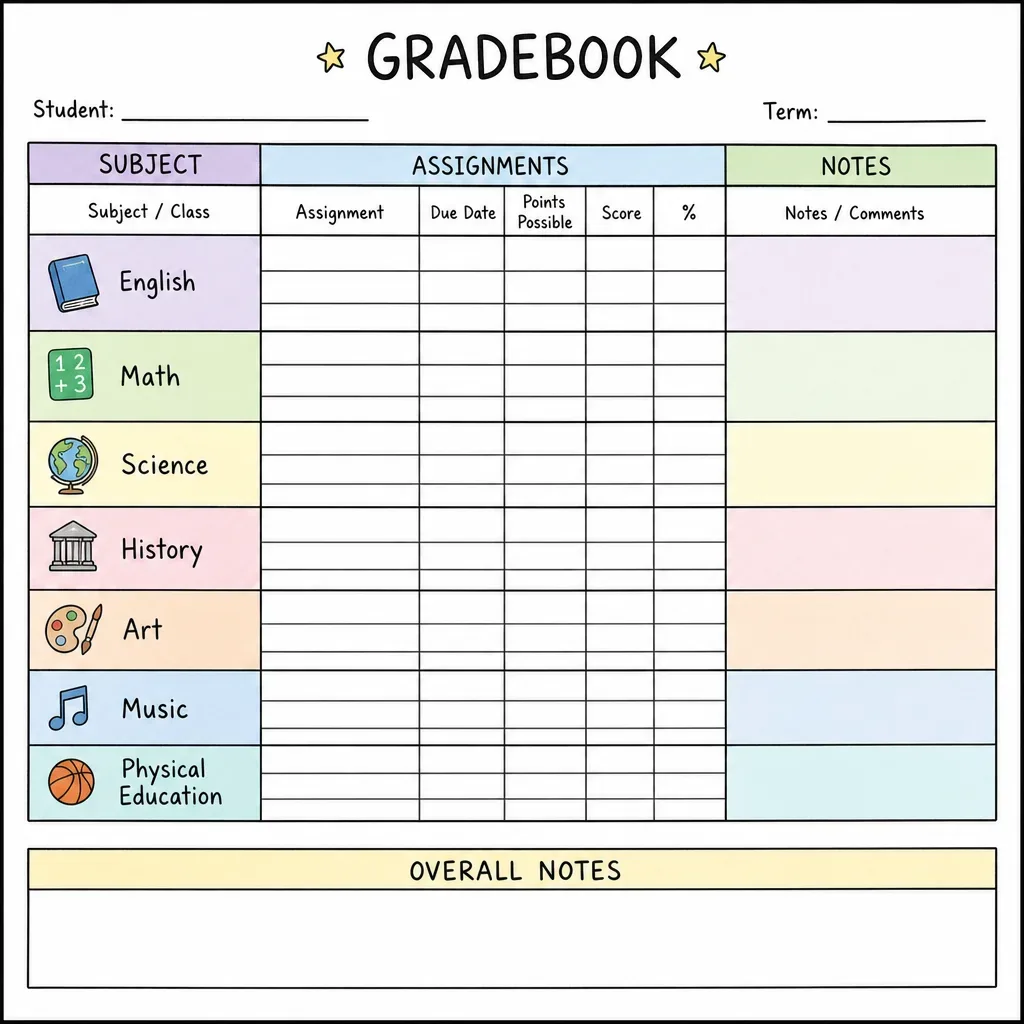
The core is a clear section for grades: subjects, assignments, and scores. Add dates - they help you spot patterns over time, like a subject that slides every time life gets busy.
Next, an attendance tracker. Homeschooling is flexible, but recording attendance keeps you consistent - and it matters if your state requires attendance documentation.
Beyond grades and attendance, leave room for progress notes. These capture the things a number cannot: how your child approached a hard problem, what finally made fractions click. Those observations paint the fuller picture.
Your homeschool gradebook should include:
- Subject and assignment list
- Grading scale and scores
- Attendance log
- Progress notes and observations
Ultimately the gradebook is there to support personalized learning. Tailor it to your family - it should serve your homeschooling, not the other way round.
Grading Scale Help: Pick a Scale (and Apply It Consistently)
If you are unsure what grading scale to use, start simple and focus on consistency. Most homeschool families land on one of these:
- Percentage: 90-100 = A, 80-89 = B, 70-79 = C, 60-69 = D, below 60 = F (adjust the cutoffs if your state or curriculum suggests otherwise)
- Letter-only: A/B/C/D/F based on mastery, without tracking exact percentages
- Mastery levels: Exceeds / Meets / Approaching / Needs Support - helpful for younger students and skill-based subjects
To keep grading fair across the year, decide three things up front: your cutoff points, how you handle late work and retakes, and whether categories are weighted (for example, tests 50%, quizzes 30%, homework 20%). Write those rules down in the gradebook itself - future you will thank present you.
If you use Google Sheets, built-in functions can calculate averages and weights for you (here is the function reference), and data validation drop-downs keep entries consistent (how-to guide).
Step-by-Step: Creating a Paper or Printable Gradebook
Building a paper gradebook can be genuinely satisfying. Start with a sturdy notebook or binder - one that will survive a full year of being hauled around the house.
Design your layout first. Each page can cover a subject or a month. Use columns for assignments, scores, and notes. Keep it simple: the easier it is to update, the more likely you are to keep it current.
You do not have to draw grids by hand. Plenty of free printable gradebook templates exist online - find one that matches your needs and print enough copies to fill your binder.
Remember, your gradebook is a personalized tool. Sketch in extras like an attendance tracker or a project planning section if they help you see the whole learning journey.
For a paper or printable gradebook, make sure you have:
- Subject and assignment headings
- Score columns
- Space for attendance and notes


The honest catch with paper: nothing is calculated for you, and there is no backup if the binder goes missing. Consistency is what keeps a paper gradebook useful - a quick weekly update beats a monthly catch-up session every time.
Step-by-Step: Building a Gradebook in Google Sheets
Google Sheets is a flexible, free way to build a digital homeschool gradebook. Open a new spreadsheet and you have a blank grid waiting for structure.
If you would rather not build the formulas yourself, our free Google Sheets gradebook template has the weighting and averages already wired up. The steps below are still worth reading, because they explain the decisions the template cannot make for you.
First, label your columns. "Assignment", "Date", "Grade", and "Comments" are a solid start - tailor them to your homeschool assessment needs.
Create a separate sheet (tab) for each subject within the same file. It keeps things organized and makes it easier to track student progress subject by subject.
Then let formulas do the math. SUM and AVERAGE will handle totals and averages instantly - this is where a Google Sheets gradebook earns its keep (see the function reference).
You can also start from a pre-made gradebook template and modify it, rather than building from scratch (how to use templates).

Two features worth setting up: conditional formatting, which highlights low grades or missing assignments so problems stand out (how-to), and sharing settings if a co-parent or co-op needs access (sharing guide).
Google Sheets saves automatically, which is one less thing to worry about. Still, keep a copy in your Google Drive so your records are accessible across devices - and update the sheet regularly so it stays accurate.
Using Gradebook Software: What to Look For
Dedicated gradebook software takes the spreadsheet idea further - but not every tool deserves a place in your homeschool. Here is what to check before committing.
First, it should be genuinely easy to use. If the interface fights you, you will stop updating it by October - and an abandoned gradebook is worse than a paper one.
Second, look for customization. Every homeschool is different, and a one-size-fits-all tool often falls short. You want to align the tool with your homeschooling approach, not bend your approach around the tool.
Third, check whether it plays nicely with tools you already use. Integration saves you from copying the same data into three places.
Fourth, favor software that handles more than grades - attendance and assessments in the same place means one system to maintain instead of several.
Essential features to seek:
- User-friendly interface
- Customization options
- Integration capabilities
- Multi-functional tracking (grades, attendance, assessments)
Finally, read the data privacy policy before you upload anything about your child. If you store or share student records digitally, it is worth understanding student-record privacy basics - the U.S. Department of Education's FERPA overview is a helpful starting point.
Where Is the Line?
A gradebook is meant to help you teach - not to turn your child into a data project. So here is a simple boundary that keeps most families on solid ground.
Keep the gradebook to learning evidence. Scores, attendance, short notes about skills, and the next step you plan to teach are all fair game.
Avoid storing sensitive personal context in tools that sync to the cloud: health details, diagnoses, family situations, or anything you would not want copied into an email by mistake. That context matters to you - but it usually does not belong in a shareable spreadsheet.
If you share records with a co-parent or co-op, use the most restrictive sharing settings, and keep “comments” short and factual. When in doubt, put sensitive context in a private notebook instead.
The “correct use” idea is the same as with any tool: let the gradebook do the repetitive tracking, but keep the judgment human. The numbers can tell you what changed. You decide why - and what to do next.
Tracking More Than Grades: Attendance, Progress, and Assessments
A homeschool gradebook is not just for scores. Attendance tracking helps you spot patterns and make sure you meet any required learning hours or days - before it becomes a year-end panic.
Progress tracking matters just as much. A running view of learning outcomes lets you step in early when something is not landing, rather than discovering it at test time.
And assessments go beyond quizzes and tests. Project evaluations, skill checklists, even a note about a great question your child asked - these capture the education that numbers miss.
Beyond grades, track:
- Attendance records
- Progress milestones
- Diverse assessments - projects, skills, observations

One thing worth saying plainly: no gradebook, however complete, replaces your judgment. The records show you patterns; you decide what they mean. A dip in maths scores might mean the curriculum needs changing - or it might mean it was a rough month and everyone needs a break. The data informs the call. You make it.
Tips for Staying Consistent and Organized
The best gradebook system is the one you actually maintain. A consistent routine is what separates a useful record from a guilt-inducing pile of blank pages.
Set a specific time each week to update records - Friday afternoon while the kids finish independent work is a popular choice. Small, regular updates prevent the backlog that makes people quit.
Some tips that help:
- Set regular update times and treat them like appointments
- Use reminders or alarms to prompt check-ins
- Review progress monthly, not just at term end

Stick to a schedule and your gradebook stays a reliable resource all year - not a reconstruction project every June.
Frequently Asked Questions About Homeschool Gradebooks
How often should I update my gradebook? Weekly works best for most families. It keeps records accurate without becoming a daily chore.
Which format is best? It depends on you. Digital formats win on convenience and automatic calculations; paper wins on simplicity and zero screens. The best format is the one you will keep up with.
Can I track more than grades? Yes - most gradebooks adapt easily to include attendance, progress notes, and project assessments. Add what your family needs.
Is it a big time investment? There is a setup cost in the first week or two. Once the system is familiar, a weekly update takes minutes, not hours.
Final Thoughts: Choosing What Works for Your Family
Choosing a homeschool gradebook format is a personal decision. Go with what fits your teaching style and your family's rhythm - not what worked for someone else's.
The aim is to make tracking as painless as possible. Digital or paper, simplicity and consistency beat elaborate systems that get abandoned by half term.
And be willing to change course. If your system is not working by the second month, adjust it. The gradebook exists to support your child's learning journey - the moment it starts adding stress instead of removing it, it is due a rethink. That flexibility is half the reason you chose homeschooling in the first place.
Once your records are in decent shape, the natural next step is turning them into something shareable. We cover that in how to create a homeschool report card with AI, and if you are curious where AI helps in teaching more broadly, start with AI for teachers.